Whether you're trying to earn your first Competitive rank or push for a higher Premier Rating, understanding the ranks CS system is essential. Since Counter-Strike 2 replaced CS:GO, Valve has introduced a new ranking structure that includes both traditional Competitive Skill Groups and the Premier Rating system, making progression more complex than before.
This guide explains every CS rank, the differences between Competitive and Premier, what each rank means, and how the ranking system actually works. We'll also cover the most common ranking questions so you can better understand your current skill level before learning how to climb the ladder faster.
What Are CS2 Competitive Skill Groups?
Competitive Skill Groups are the traditional rank badges carried over from CS:GO. Unlike the old system, however, CS2 assigns a separate Competitive rank for each map. This means your Mirage rank can differ from your Inferno or Nuke rank, allowing your skill on individual maps to be reflected more accurately.
Competitive Skill Groups match you with players of similar skill and update based on your match results. Win the required placement matches on each map to earn and display your rank.
Complete CS2 Competitive Rank List
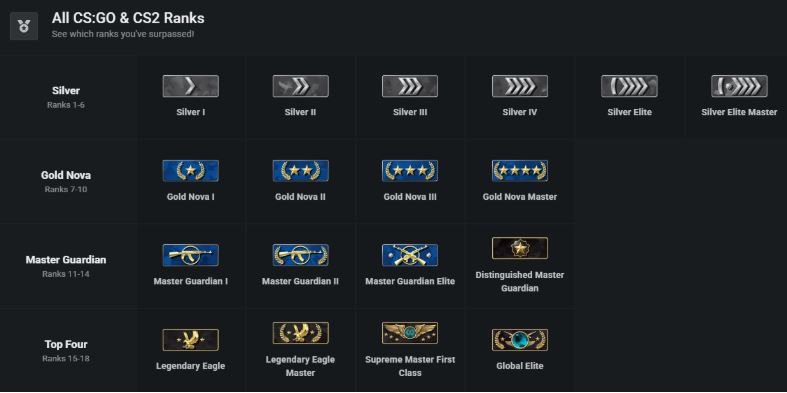
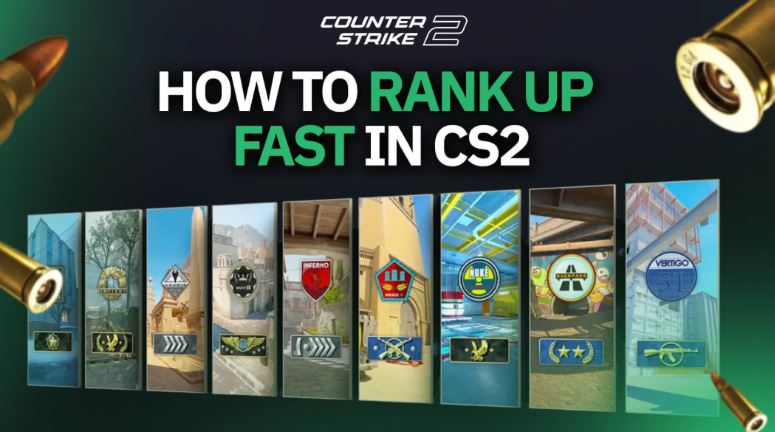
CS2 currently uses the same 18 Competitive Skill Groups familiar to longtime Counter-Strike players. Check the CS Global Offensive ranks:
Rank |
Skill Level |
Typical Player |
Silver I |
Beginner |
Learning game mechanics |
Silver II |
Beginner |
Basic map knowledge |
Silver III |
Beginner |
Improving aim and movement |
Silver IV |
Beginner |
More consistent gameplay |
Silver Elite |
Lower Intermediate |
Better positioning |
Silver Elite Master |
Lower Intermediate |
Ready for higher competition |
Gold Nova I |
Average |
Casual players with solid fundamentals |
Gold Nova II |
Average |
Good game awareness |
Gold Nova III |
Average |
Consistent teamwork |
Gold Nova Master |
Above Average |
Reliable mechanical skills |
Master Guardian I |
Intermediate |
Strong utility usage |
Master Guardian II |
Intermediate |
Good tactical understanding |
Master Guardian Elite |
Upper Intermediate |
Consistent performances |
Distinguished Master Guardian |
Advanced |
High-level game sense |
Legendary Eagle |
Advanced |
Excellent aim and communication |
Legendary Eagle Master |
Expert |
Highly competitive players |
Supreme Master First Class |
Elite |
Top percentage of players |
Global Elite |
Elite |
One of the highest Competitive ranks |
Generally speaking:
Silver players are still learning the fundamentals.
Gold Nova represents the average player base.
Master Guardian players usually demonstrate solid mechanics and teamwork.
Legendary Eagle and above require strong consistency across aiming, positioning, and communication.
Global Elite remains one of the most prestigious Competitive ranks in the game.
Keep in mind that your Competitive rank is unique to each map, so reaching Global Elite on one map doesn't automatically carry over to another.
CS2 Competitive Rank vs Premier Rating
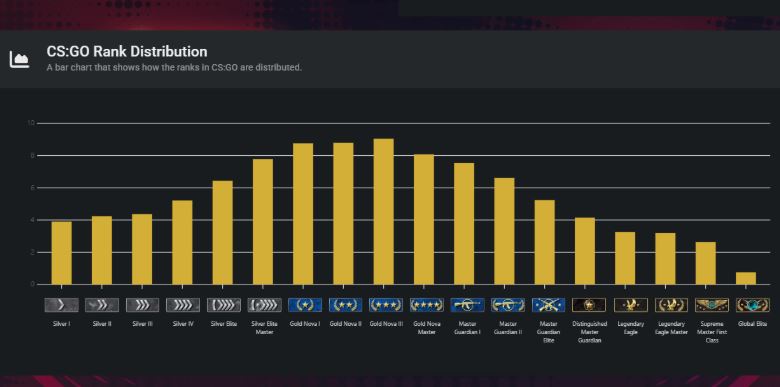
One of the biggest sources of confusion for new players is that CS2 now features two completely different ranked systems.
Feature |
Competitive |
Premier |
Ranking System |
18 Skill Groups |
Numerical CS Rating |
Rank Type |
Separate rank for each map |
One overall rating |
Best For |
Learning maps |
Serious competitive play |
Progress Display |
Rank badge |
Rating number (0–35,000+) |
Match Format |
Standard Competitive |
Pick/Ban with tournament-style rules |
Competitive Mode is ideal if you're improving on specific maps or playing casually with friends. Since each map has its own rank, you can practice new maps without affecting your performance elsewhere.
Premier Mode, meanwhile, is considered the flagship ranked experience in CS2. Instead of rank badges, players receive a CS Rating, which increases or decreases after each match. Premier also includes a map veto system similar to professional tournaments, making it the preferred mode for highly competitive players.
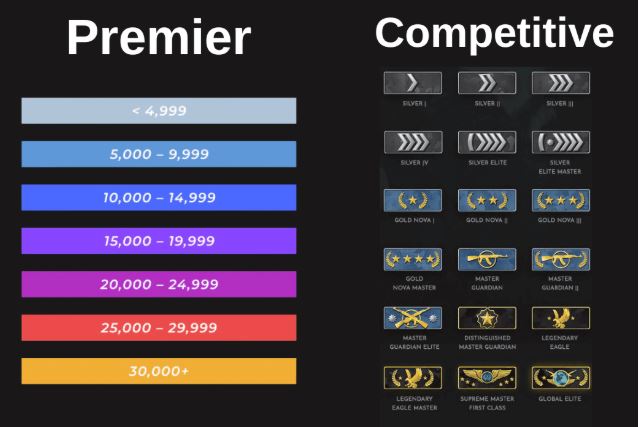
It's important to understand that these systems are completely independent. Improving your Premier Rating won't increase your Competitive Skill Groups, and ranking up on a Competitive map won't affect your Premier Rating.
Do You Need Prime Status to Get a Rank?
Yes. Players without Prime Status can still enjoy most game modes, but they cannot earn Competitive Skill Groups or Premier Ratings. Prime users are matched primarily with other Prime players, can earn XP, receive weekly care packages, and unlock Premier matchmaking after reaching Profile Level 10.
For anyone planning to take ranked play seriously, Prime Status is essentially a requirement, as it provides access to the full competitive progression system and generally offers a better matchmaking experience.
Why Am I Not Ranking Up in CS2?
One of the most common questions among competitive players is, "Why am I keeping winning but not ranking up?" The answer is that CS2 doesn't promote players based on a single match or individual statistics alone. Instead, the game evaluates your long-term performance using a hidden matchmaking rating (MMR), then adjusts your visible Competitive Skill Group or Premier Rating accordingly.
Several factors may affect your progression:
Win-loss consistency: Regular victories matter more than occasional win streaks.
Opponent strength: Defeating stronger teams generally has a greater impact than beating lower-rated opponents.
Hidden MMR: Your visible rank doesn't reveal the full skill calculation used for matchmaking.
Recent match history: The system looks for consistent performance over multiple games rather than rewarding one exceptional match.
Many players also assume that top-fragging or earning the most MVPs guarantees a promotion. While strong individual performances certainly help your team win, Valve has never confirmed that kills or MVPs alone determine rank changes. Ultimately, winning matches consistently remains the most reliable way to climb.
How to Rank Up Faster in CS2
While no shortcut guarantees a higher rank, to enhance your rank in CSGO, the following habits can significantly improve your chances of climbing the competitive ladder.
1. Master a Small Pool of Maps
Since Competitive ranks are tracked separately for each map, focusing on two or three maps allows you to build stronger game knowledge, better utility usage, and more consistent results.
2. Prioritize Team Communication
CS2 is a team-based tactical shooter. Clear callouts, coordinated executes, and timely information often contribute more to winning than individual fragging.
3. Play Consistently Instead of Grinding
Long losing streaks caused by fatigue can quickly erase previous progress. Playing fewer matches while maintaining focus generally leads to more stable improvement.
4. Learn Utility Usage
Well-placed smokes, flashes, and Molotovs can completely change the outcome of important rounds. Utility knowledge becomes increasingly important from Master Guardian and above.
5. Improve Both Aim and Positioning
Mechanical skill is important, but crosshair placement, movement, trading teammates, and positioning often separate higher-ranked players from average ones.
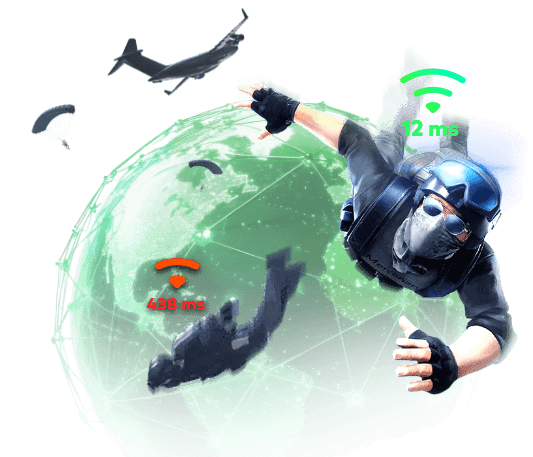
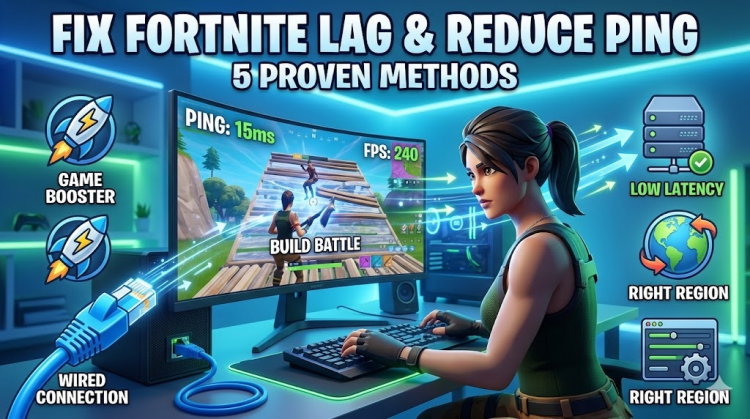
6. Maintain Stable FPS and Low Ping
Even excellent mechanics can be limited by technical issues. High latency, packet loss, FPS drops, and system stuttering may cause delayed reactions, inconsistent hit registration, or missed opportunities during crucial rounds.
Improve Your CS2 Performance with Stable FPS and Low Ping
Many players focus entirely on aim training while overlooking another factor that directly affects competitive performance: system stability and network quality. In a fast-paced FPS like CS2, maintaining smooth frame rates and a responsive connection can make gameplay feel more consistent, especially during intense firefights.
Smart Game Booster is designed specifically for PC gamers, combining performance optimization and network acceleration in one platform to help reduce common issues that may interrupt competitive matches.
Key Features of Smart Game Booster
- Enjoy lag-free & low-ping gaming
- 100+ games supported
- Severs from all over the world
- Boost in-game FPS
Network Boost:
This ping reducer's network acceleration features are designed to improve connection quality by:
Reducing ping through optimized game routes
Minimizing packet loss and network jitter
Selecting more stable connections automatically
Helping avoid congestion during online matches
For CS2 players, a more stable connection can reduce delayed shots, rubber-banding, and inconsistent hit registration, resulting in a smoother competitive experience.
Performance Optimization:
Besides network improvements, Smart Game Booster also helps optimize your PC before launching games by:
Closing unnecessary background processes
Freeing CPU and RAM resources
Cleaning temporary files
Optimizing Windows settings for gaming
Updating outdated drivers
Allocating more system resources to your game
These FPS Boost optimizations may help reduce FPS drops and stuttering, allowing gameplay to remain smoother during long competitive sessions.
Real-Time Hardware Monitoring:
The built-in monitoring tools display important performance metrics while gaming, including:
FPS
CPU usage
GPU usage
Hardware temperature
Memory usage
This allows players to quickly identify performance bottlenecks without leaving the game.
Rather than replacing practice, these features help ensure your PC and network don't become unnecessary obstacles while you're working toward a higher CS2 rank.
How to Boost CS2 with Smart Game Booster
Step 1. Download and Install Smart Game Booster.
Step 2. On the left, select Boost, and click Counter-Strike 2 from your game library.
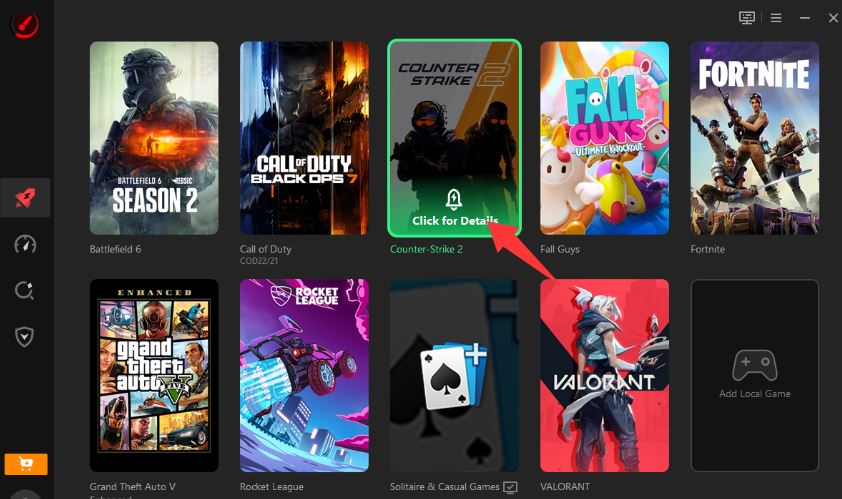
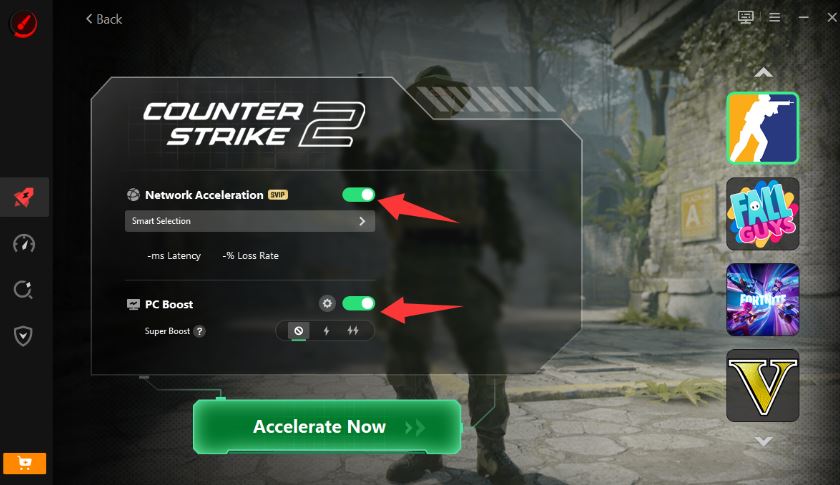
Step 3. Enable Game Boost and PC Boost, and click Accelerate Now.
Step 4. Launch CS2 and Monitor Performance
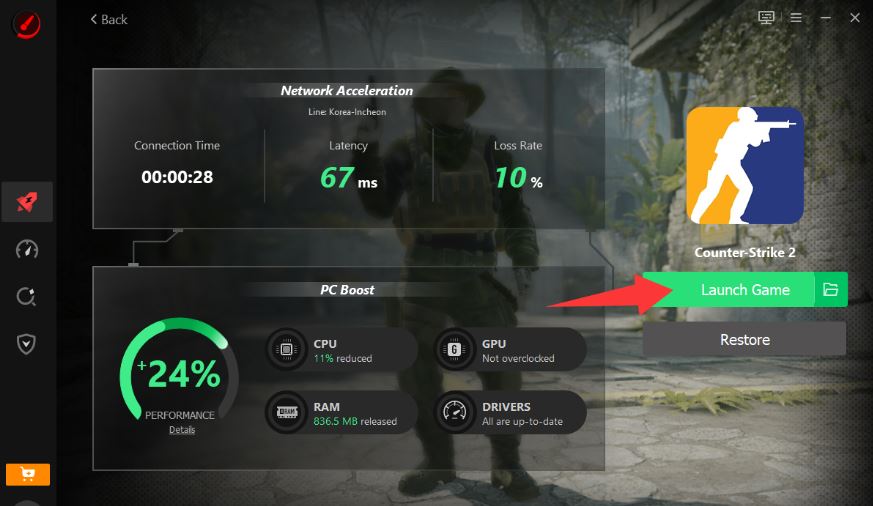
Start CS2 directly from Smart Game Booster, a good game launcher PC, and use the built-in performance monitor to check your FPS, CPU, GPU, and temperature in real time during gameplay.
FAQs about CS Ranks
1. Why did my CS2 rank disappear?
If you've been inactive for an extended period, your Competitive Skill Group may temporarily disappear. Simply win one Competitive match on that map to receive an updated rank.
2. Does Premier Rating affect Competitive Rank?
No. Premier Rating and Competitive Skill Groups are two completely separate ranking systems and don't influence each other.
3. Does playing with lower-ranked friends hurt my rank?
Not necessarily. Valve states that matchmaking accounts for the skill levels of all players in a party when creating balanced matches, so playing with lower-ranked teammates isn't automatically harmful to your own ranking.
4. Is Prime Status required for ranked play?
Yes. Prime Status is required to earn Competitive Skill Groups, receive a Premier Rating, and access Premier matchmaking.
5. Can good individual stats guarantee a rank-up?
No. While strong performances help your team win, CS2 primarily rewards consistent match results over time rather than a single game's kills or MVP count.
Conclusion
Understanding how CS2 ranks work is the first step toward climbing the competitive ladder. By combining consistent teamwork, solid game fundamentals, and a stable gaming environment with smooth FPS and reliable network performance, you'll be better prepared to improve your Competitive rank or Premier Rating over time. Plus, it tests your PC's game compatibility with its Can I Run It tester, checking if your build can run the target games smoothly. Download now to get better gaming performance in CS.