Valorant has solidified its place as one of the most popular tactical first-person shooters since its debut. It attracts millions of players from different regions to compete and climb ranks everyday. Meanwhile, some players find themselves needing to change their locations for playing with friends overseas, moving to new country or experiencing different playstyles on another server. However, the account region restriction makes it not always as simple as selecting a new location in settings.
How to change region in Valorant? Let's discover how region-lock works in Valorant and perform Valorant region change without affecting your gaming experience.
Understand Valorant Region Lock
Unlike some games that completely prevent players from accessing servers abroad, Valorant links the region lock to your Riot Games account. When you first sign up for an account, the system permanently assigns a Region of Residence (RoR) and a corresponding Shard (the server you can play on) based on your physical location, with the purpose of providing lower latency, fairer matchmaking, region-specific currency and pricing. Generally, you can only change the Shard and RoR to match the geographical area you live in.
Is it impossible to change Valorant region? Not exactly. Riot supports changing your RoR under certain circumstances, while VPN is considered as another working solution.
How to Change Region in Valorant Officially
Riot designs account transfer for Valorant players who permanently relocate to another country to automatically update the region. If auto-update is unavailable or the region is still incorrect, you can also request a region change through Riot Games Support.
Follow the steps to change region in Valorant.
Step 1. Visit the support page below and sign in your account.
https://support.riotgames.com/en-us/valorant/account/changing-your-region-of-residence-for-your-riot-account
Step 2. Click the CHECK button. The system will detect your location and make an instant region change if your RoR is able to be updated.
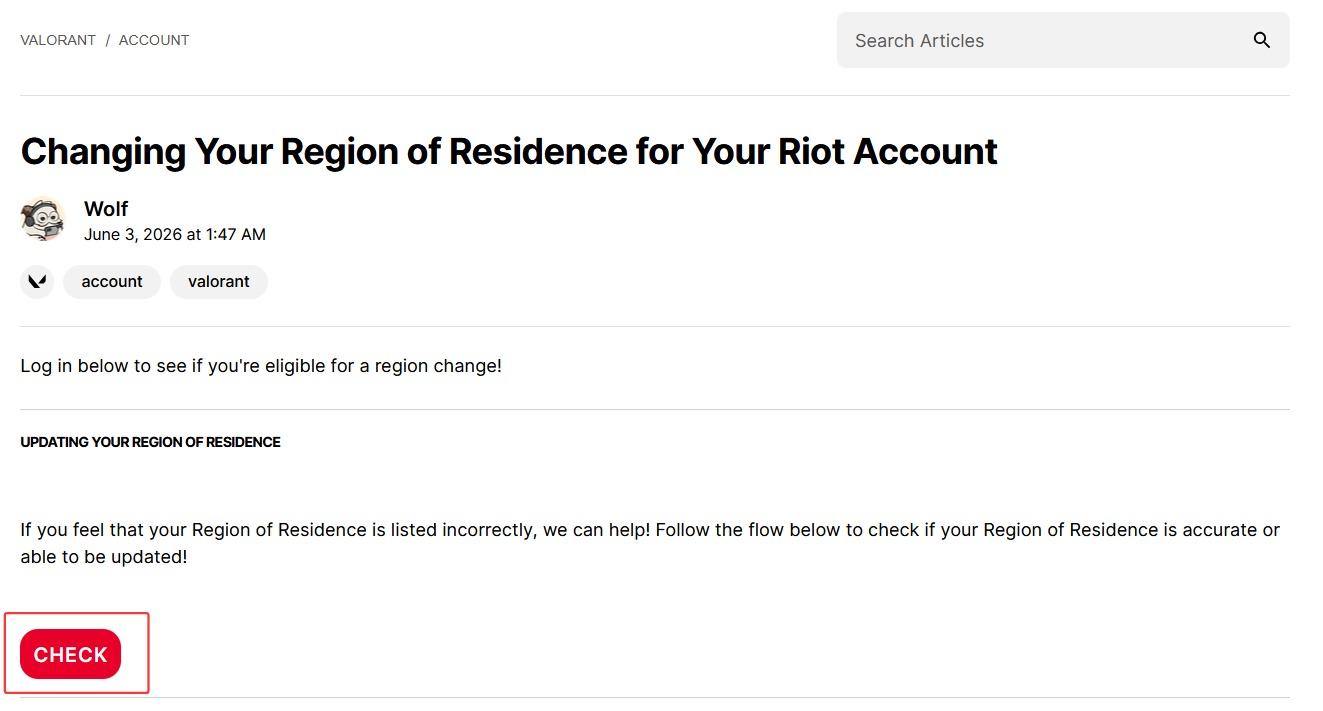
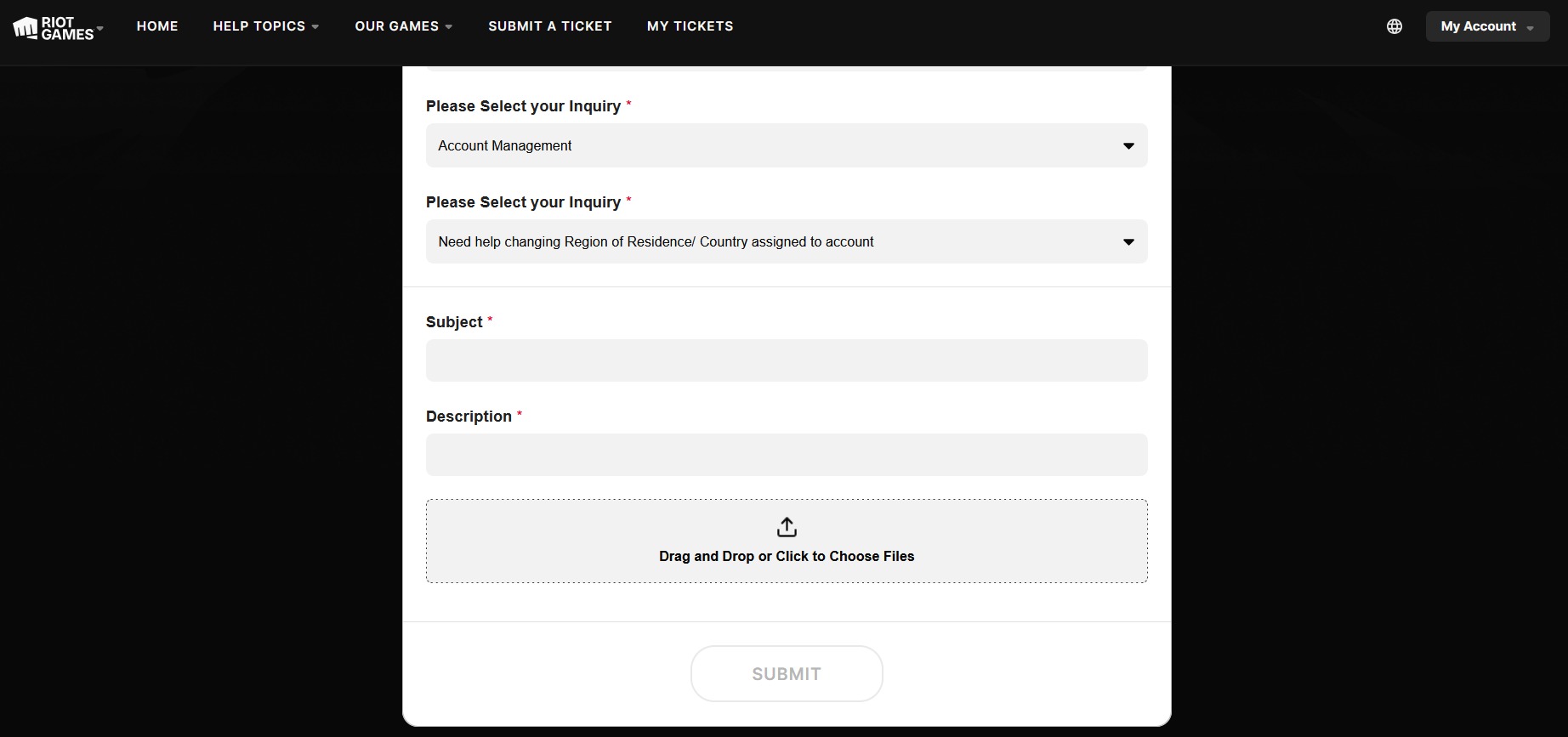
Step 3. If it doesn't work, submit a ticket to request a change in your RoR.
Go to https://support.riotgames.com/en-us/riot/tickets/submit.
Select product (Valorant) and category (Account Management).
Select your inquiry as "Need help changing Region of Residence/Country assigned to account".
Give Subject and Description. You should provide the information including username, Riot ID and tagline, email, current RoR and RoR you want to transfer to, in the request.
The method is best for: players who have permanently moved to a new country or relocated for work/study.
Notice: You cannot request another transfer for 90 days once your account is changed to a different RoR.
How to Change Region in Valorant with VPN
If you live in United States but want to change Valorant region to EU, Asia, etc., for playing with overseas friends, try to create a new account with desired region using VPN.
Step 1. Choose a reliable VPN and connect to a specific region you want.
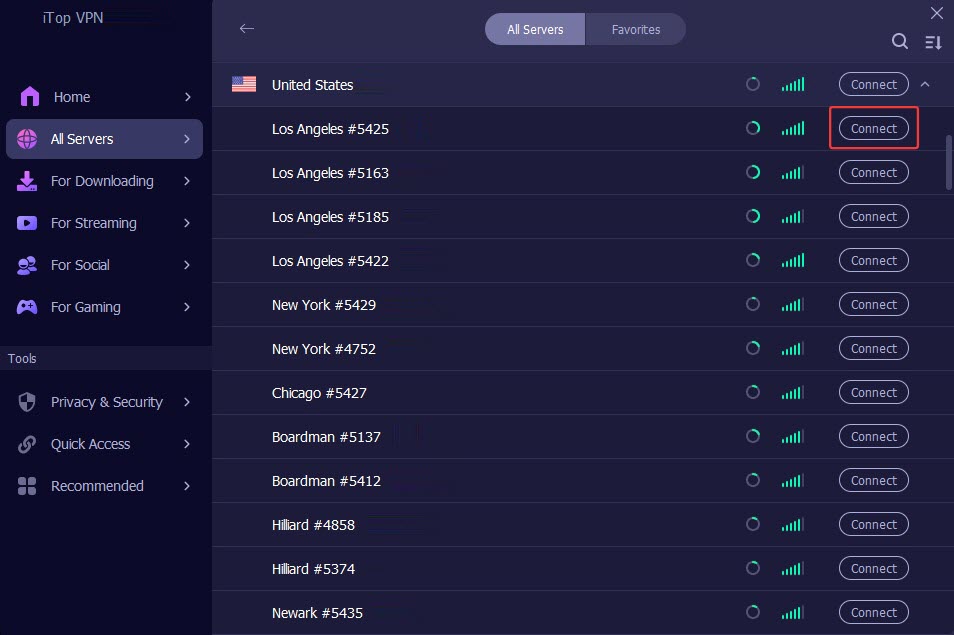
Step 2. After the connection completes, visit Riot Games official site in incognito mode.
Step 3. Sign up a new account. Riot Games uses a geo-IP detection system during registration and automatically lock the new account to the IP changed by VPN.

Step 4. Now, log into Valorant with the new account and play with your friends.
Using a VPN is good for: players who want a secondary account for cross-region play with friends or experiencing unique gameplay patterns in different regions.
Notice: Although VPN helps you get access to servers in other regions, it may cause latency or connection issue for playing on distance servers.
How to Improve Gaming Performance for Valorant After Region Change
While Valorant region change acts as an easy fix to play with international friends and escape bad server queues, many players experience high ping and network performance issues when playing in a different region. Don’t need to blame it on the transfer. Smart Game Booster helps deliver lag-free gameplay on any server.
Key Features of Smart Game Booster
- Enjoy lag-free & low-ping gaming
- 100+ games supported
- Severs from all over the world
- Boost in-game FPS
Smart Game Booster is specially designed to level up your gaming experience. It offers 500+ worldwide servers, not only letting you select the closest server for faster connection, but bypassing network bottleneck to lower ping and fix packet loss. Its PC boost feature unblocks the power to overlock GPU/VRAM for maximal FPS boost and peak PC performance.
The game booster also includes a set of tools to optimize your system for gaming. Whether you want to release resources for faster load times or update GPU/audio drivers for stability, it allows you to perform the optimization in one click. It also shows a real-time monitor to check your FPS and latency in Valorant.
Smart Game Booster has an user-friendly interface so that beginners can quickly learn how to get started with it, no guesswork or technical skills.
Here is a step-by-step guide of how to boost Valorant performance in any region.
Step 1. Download and install Smart Game Booster on your PC.
Step 2. Open the program and click Valorant for details.
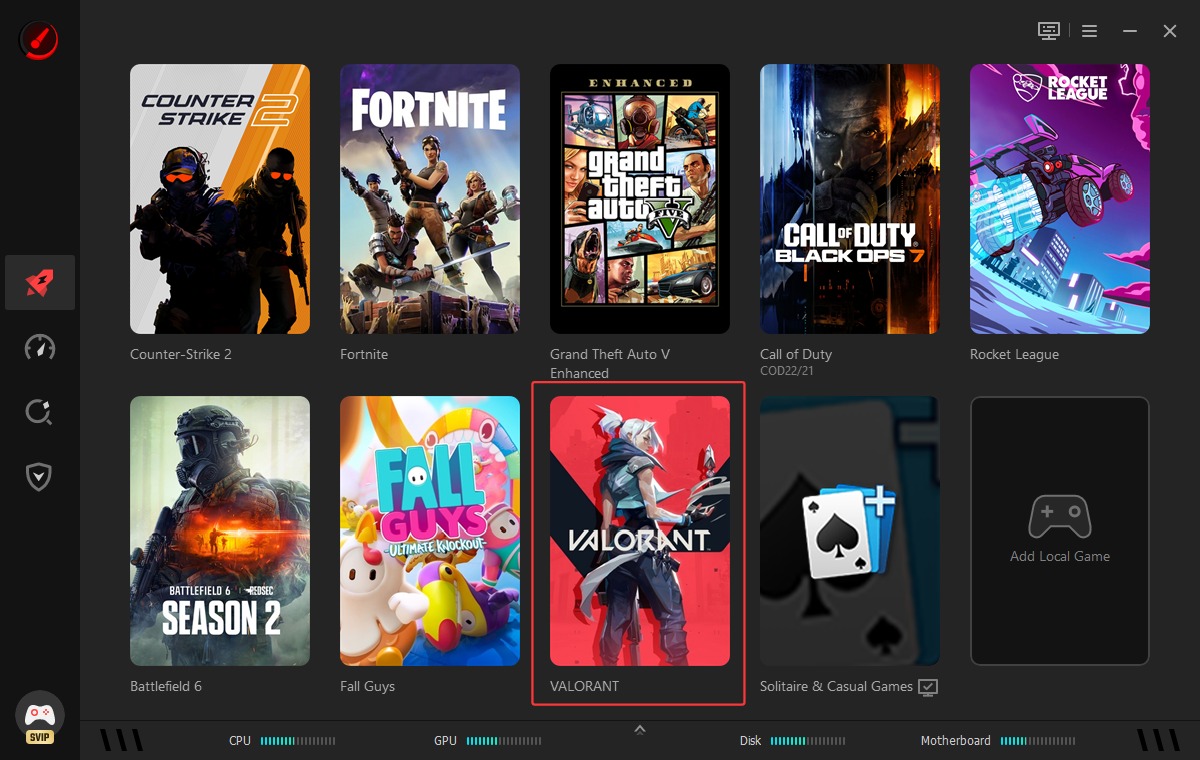
Step 3. Turn on Network Acceleration and click Smart Selection. Under PC Boost, you can choose a mode for getting more FPS in Valorant.
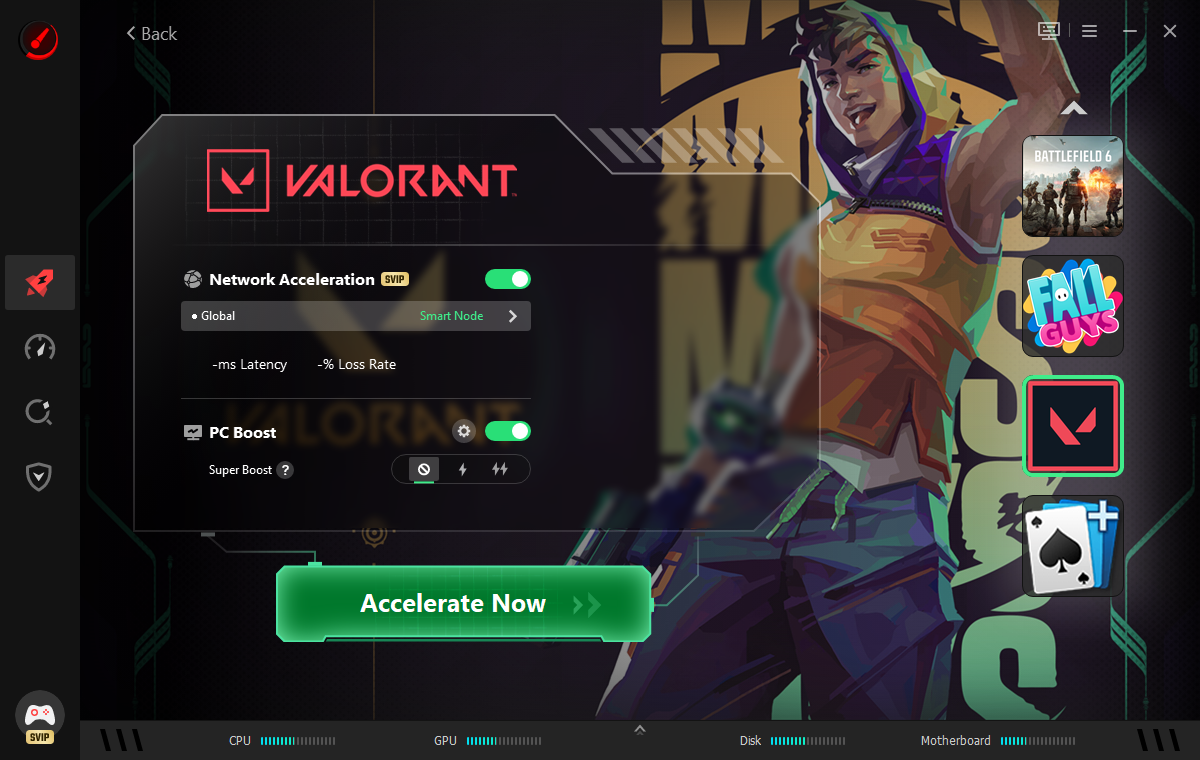
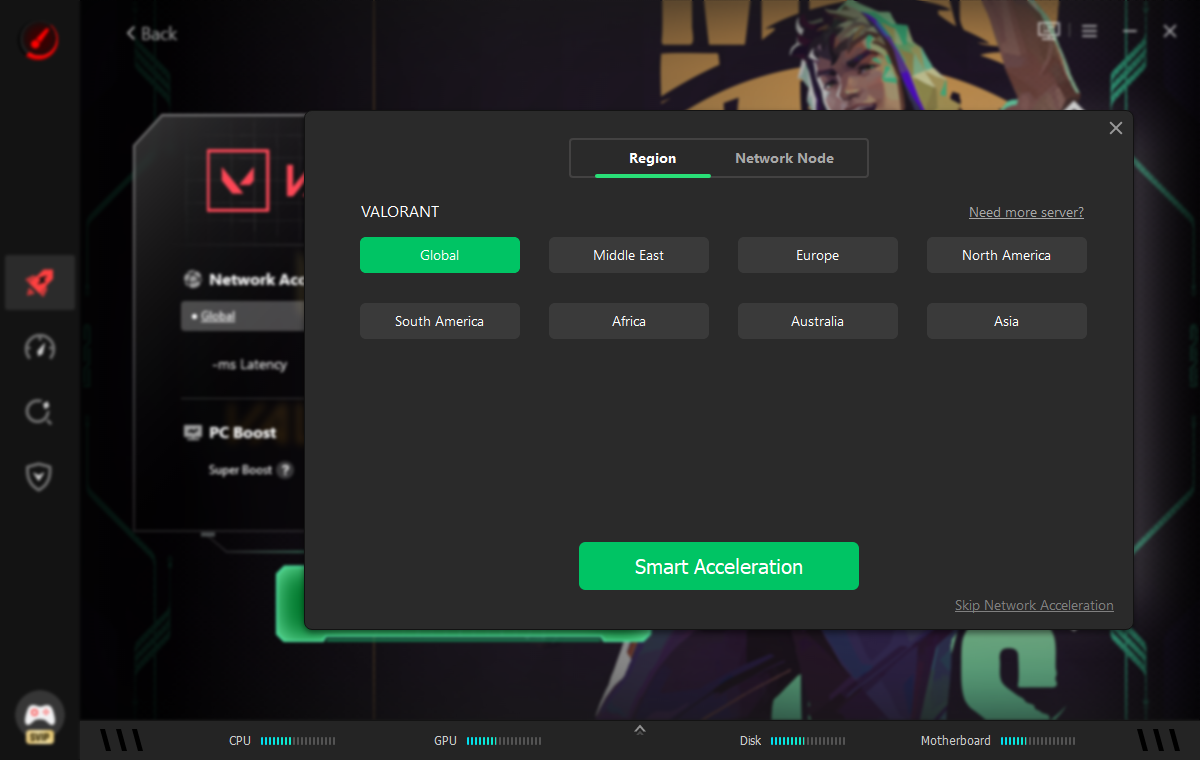
Step 4. Select the region that matches with the RoR locked to your account. Click Smart Acceleration. Also, you can switch to Network Node, select a server in specific region and start acceleration.
Step 5. Smart Game Booster shows the acceleration status. Check it and click Launch Game to play Valorant smoothly.
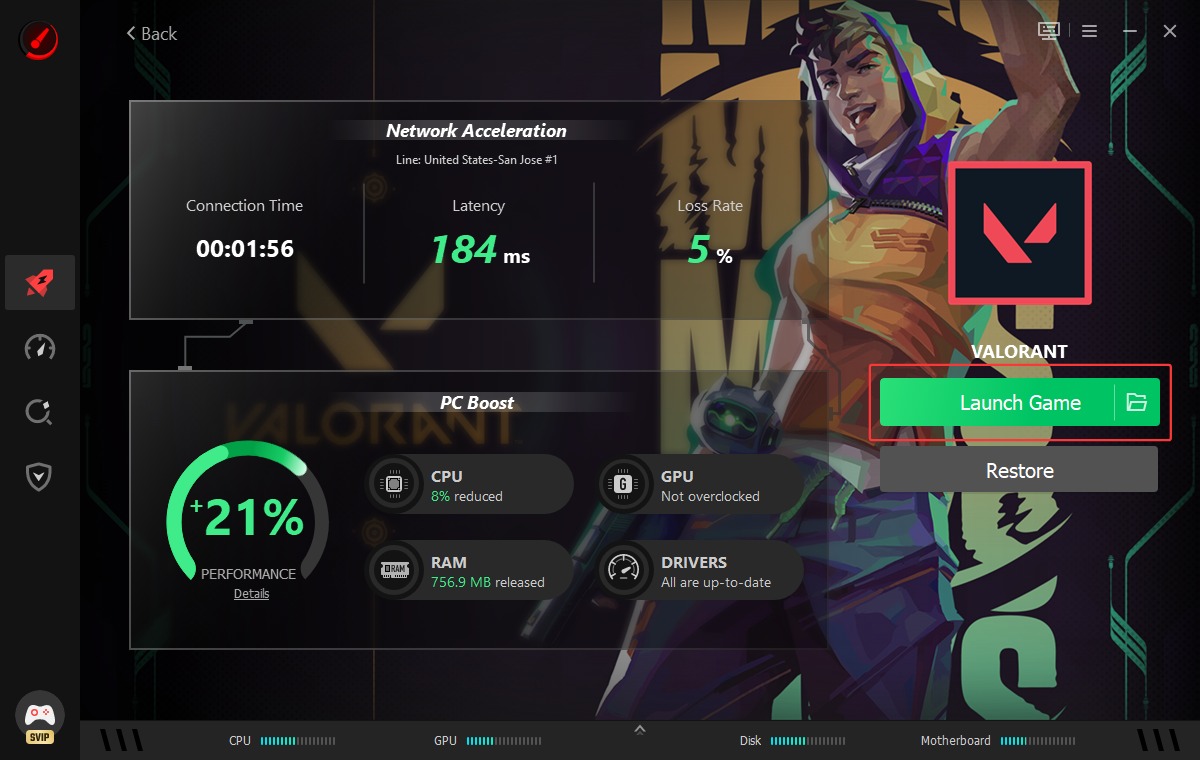
With Smart Game Booster, you can enjoy seamless gaming experience, eliminating lags, fps drops and other issues when playing on another servers.
FAQs About Valorant Region Change
What will happen after region transfer?
Some account data will not be reset or deleted - including your current ranked season data, purchase history, match history and night market skin offers - after region transfer. But, all data can be kept if you transfer between the North America, LATAM or Brazil shards.
If you change region in Valorant using a VPN, your account may be assigned to a distant region, leading to high ping, input delay and unstable matches.
Why can't you change region in Valorant?
If Riot refuses to changing your region, there are some common reasons:
Riot has detected that your current RoR is correct.
You doesn't offer enough information that supports the request, Riot may deny the transfer.
You are within the 90-day cooldown.
Your account are suspicious or inactive.
You use a VPN during verification.
Some regions, like China and Vietnam, have separate publisher partners, preventing standard region transfer.
If your request is denied, review the reason provided by Riot Support and submit a ticket again when you are eligible for region change.
Also, if you fail to change Valorant region with a VPN, try to use another reliable service, for example iTop VPN, and create a new account in your desired region.
What is the best region in Valorant?
It depends on what matters most to you.
For competitive experience, your own RoR is the best choice for lowest latency and stable matchmaking.
For Esports Dominance, Americas, EMEA, Pacific and China are currently tied at the top of international Valorant.
For casual ranked: NA offers the best voice communication, while APAC has the most intense gunplay.
The Bottom Line
Unlike many games that lets your freely pick a server, Valorant gates the region transfer to provide the best balance of smooth gameplay and compliance with the policies. Alternative to submitting a request to change region in Valorant through Riot Support, players can also create an account locked to desired location with a VPN. However, some gaming issues, like high ping and potential connection failure, may happen after region change. Smart Game Booster ensures optimized gaming performance, helping reduce ping and boost FPS in Valorant. Whenever you experience lags when playing Valorant, this game booster can be the best fix.
Key Features of Smart Game Booster
- Enjoy lag-free & low-ping gaming
- 100+ games supported
- Severs from all over the world
- Boost in-game FPS