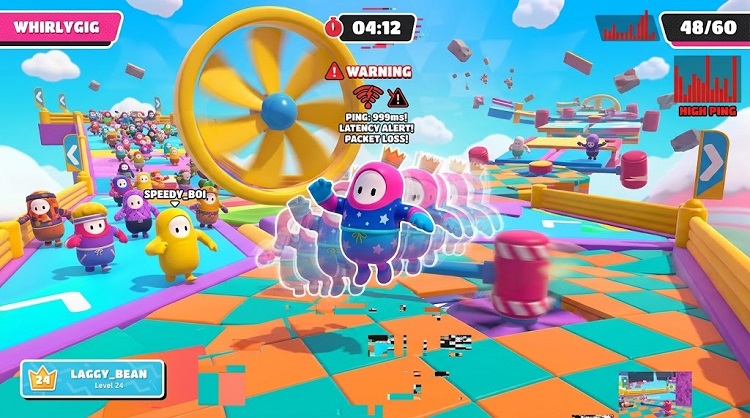
Navigating through obstacle courses and tumbling toward the crown in Fall Guys should be an exhilarating and smooth experience. However, encountering unexpected Fall Guys lag can instantly ruin your gaming session. Common issues include sudden FPS drops, annoying stuttering, screen freezing, delayed character movement, or frustrating rubber-banding where your jelly bean teleports across the screen.
Whether you are playing casually with friends or competing intensely, performance glitches can cost you the qualification round. Fortunately, this comprehensive guide covers 8 practical fixes for both PC performance and network-related lag, including helpful solutions like Smart Game Booster to elevate your gaming experience. Let us dive into the root causes and actionable steps to resolve these hiccups.
Why Is Fall Guys Lagging on PC?
Before jumping straight into troubleshooting, it is essential to understand why Fall Guys is lagging in the first place and how it affects your competitive edge. Generally, performance disruptions in multiplayer games stem from two primary categories: hardware limitations (PC performance) and network instability (connection problems). Recognizing whether you are dealing with low FPS and stuttering or high ping and connection latency will help you apply the correct Fall Guys lag fix.
Several key factors contribute to these issues:
Insufficient Hardware Resources: Outdated CPUs, limited RAM, or entry-level graphics cards struggle to render the colorful, physics-heavy levels of Fall Guys smoothly.
Unstable Network Connection: High packet loss, wireless interference, or congested bandwidth leads directly to delayed inputs and rubber-banding.
Background Application Bloat: Running heavy browsers, recording software, or cloud sync tools in the background drains vital system memory and processing power.
Outdated Drivers and Corrupted Files: Old graphics drivers or damaged game files can trigger unexpected crashes, frame drops, and severe stuttering.
How to Fix Fall Guys Lag: 8 Practical Ways
Knowing how to fix Fall Guys lag depends entirely on whether the root cause originates from the game server, your local network setup, or your computer’s processing hardware. To achieve the best results, we recommend testing Fall Guys after completing each method to see if your performance improves.
Method 1: Check Fall Guys Server Status
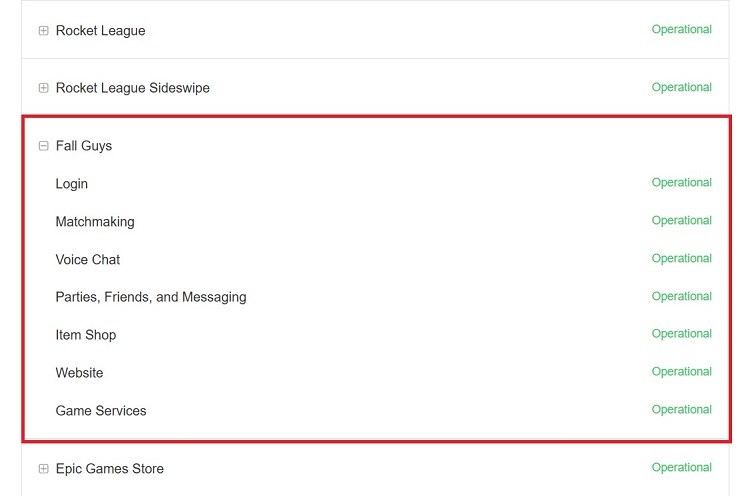
Sometimes, the problem has nothing to do with your personal hardware or internet router. Fall Guys server outages, unexpected downtime, or scheduled maintenance can cause connection failures, matchmaking errors, high latency, and other online gameplay problems even when your PC is running normally.
Step 1: Open your preferred web browser and navigate to the official Epic Games Server Status page or the official Fall Guys Twitter/X support handle.
Step 2: Look for the specific status indicator corresponding to Fall Guys online services and matchmaking systems.
Step 3: If the servers are undergoing maintenance or experiencing an outage, wait patiently until developers restore normal service before attempting to launch the game again.
Method 2: Improve Your Local Network Connection
If Fall Guys shows delayed movement, rubber-banding, matchmaking problems, or unstable online gameplay while the official servers are working normally, you need to troubleshoot your own network connection. This method focuses specifically on connection-related lag—such as high ping and delayed actions—rather than graphical FPS drops.
Step 1: Restart your router and modem by unplugging the power cables for 30 seconds and plugging them back in to clear temporary routing caches.
Step 2: If possible, switch from an unstable Wi-Fi connection to a wired Ethernet cable to minimize packet loss and latency spikes.
Step 3: Pause large downloads, cloud backups, or streaming activities that may consume network bandwidth. If multiple devices share your connection, temporarily disconnect unnecessary ones to reduce network congestion. You can also try a specialized ping reducer to help optimize your connection for online gaming.
Method 3: Lower Fall Guys Graphics Settings
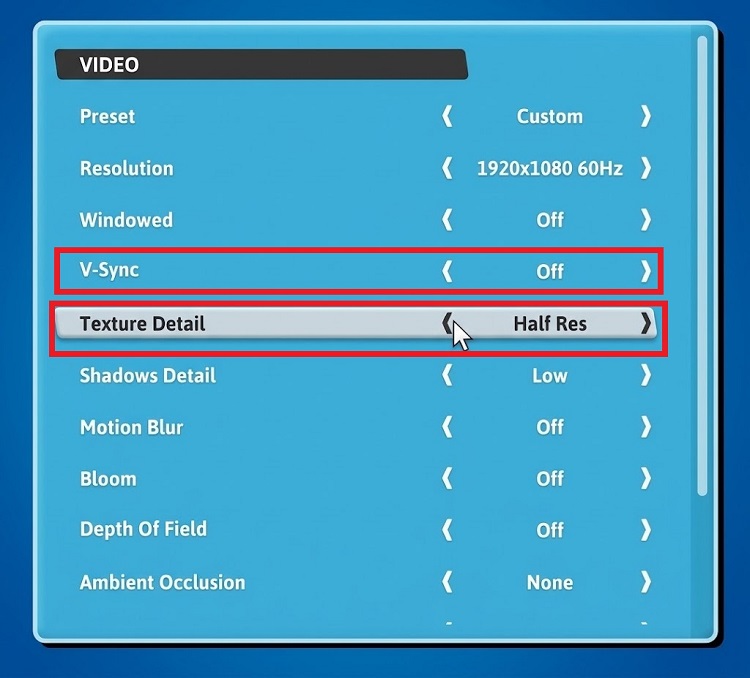
Running the game on ultra-high graphics settings can place excessive load on your GPU and CPU—especially on older or entry-level laptops and desktops—resulting in persistent frame drops and stuttering, which are common Fall Guys lag PC issues.
Step 1: Launch Fall Guys and click on the Settings gear icon located in the top right corner of the main menu.
Step 2: Navigate to the Video settings tab. Lower graphics options such as Shadows Detail and Texture Detail, and disable effects like Motion Blur and Depth of Field to reduce GPU load. You can also try turning off V-Sync to reduce input latency, although this may cause screen tearing. If FPS remains low, consider lowering the display resolution.
Step 3: Switch the display mode from Windowed to Fullscreen to ensure your GPU dedicates its maximum rendering power directly to the game window.
Method 4: Close Resource-Heavy Background Programs
Having too many resource-hungry applications running simultaneously in the background can consume critical CPU, RAM, disk, and network bandwidth, significantly worsening Fall Guys lag during intense rounds and contributing to Fall Guys lag PC stutters.
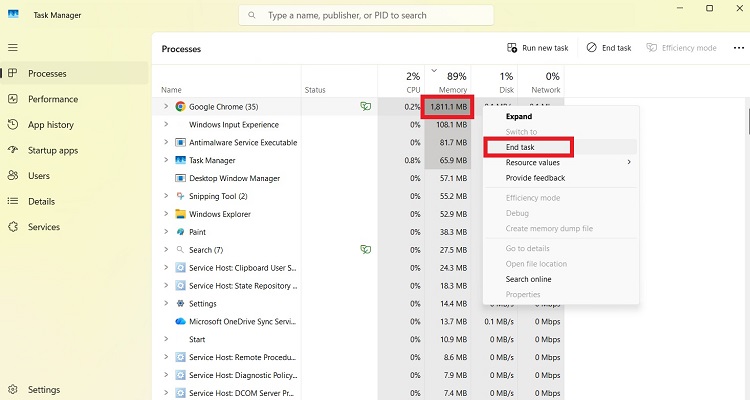
Step 1: Press Ctrl + Shift + Esc on your keyboard to open the Windows Task Manager.
Step 2: Under the Processes tab, review applications like web browsers with multiple open tabs, Discord overlays, or torrent clients that consume high percentages of CPU and memory.
Step 3: Right-click on each unnecessary background application and select End Task to free up system resources for Fall Guys. If you enjoy other titles like Roblox, you might also benefit from using a free lag reducer for Roblox to optimize your gaming environment.
Method 5: Enable Game Mode and Use the High-Performance GPU
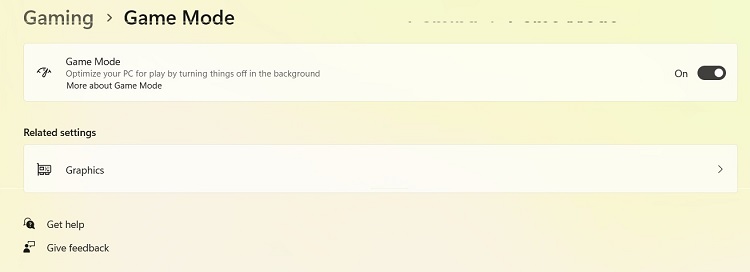
Windows Game Mode optimizes your operating system resources during gaming sessions, while graphics preference settings ensure that laptops with dual graphics cards assign Fall Guys to the dedicated high-performance GPU rather than the integrated chip.
Step 1: Press Windows + I to open Windows Settings, navigate to the Gaming category, select Game Mode, and toggle the switch to On.
Step 2: Go to Settings > System > Display > Graphics and browse for the Fall Guys executable file.
Step 3: Click on Options, select High Performance, and save your changes to guarantee maximum graphical power utilization alongside an efficient FPS booster utility.
Method 6: Fix Fall Guys Lag Easily with Smart Game Booster
For players seeking a streamlined, automated approach to system optimization, introducing a dedicated utility can save considerable time. Smart Game Booster is a robust all-in-one software designed to help reduce performance-related stuttering and optimize frame rates for a smoother gameplay experience.
Key Features of Smart Game Booster
- Enjoy lag-free & low-ping gaming
- 100+ games supported
- Severs from all over the world
- Boost in-game FPS
Step 1: Download, install, and open Smart Game Booster on your Windows PC.
Step 2: Click on the Boost button from the top-left side of the panel. Find Fall Guys from the list of the games.
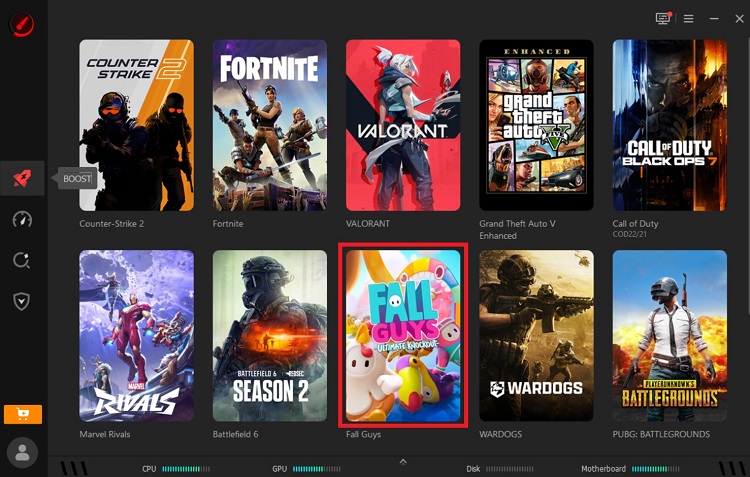
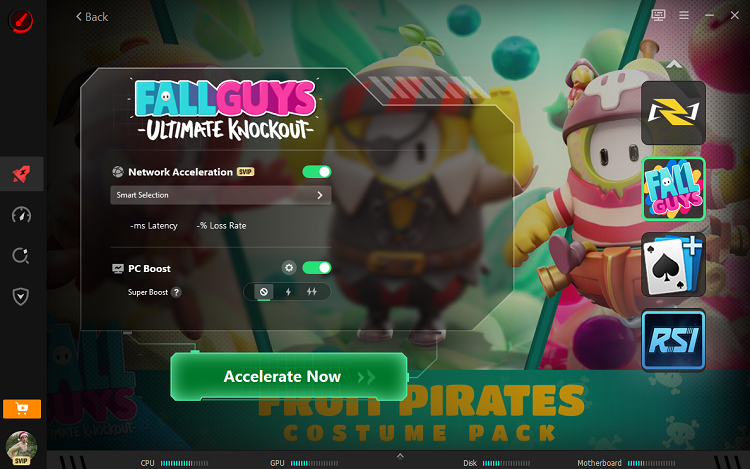
Step 3: Hover on it and Click for Details. Optimize the Fall Guys performance by toggling on the Network Acceleration and PC Boost. Click on Accelerate Now to enjoy an automatically optimized gaming environment with enhanced frame rates.
Key Features for Fixing Fall Guys Lag
Reduce Fall Guys Lag by Freeing CPU and RAM: Instantly terminates background junk processes to maximize available system memory.
Improve Fall Guys FPS for Smoother Gameplay: Overclocks GPU safely and boosts frame rates for fluid, responsive obstacle navigation.
Prevent Fall Guys Lag Caused by Outdated Drivers: Scans and updates essential graphics and audio drivers to ensure optimal hardware compatibility.
Monitor Fall Guys FPS and Hardware Performance in Real Time: Tracks temperature, CPU load, and live frame rates directly on your screen.
Automatically Optimize the PC Before Playing Fall Guys: Triggers system enhancements automatically the moment you launch your favorite games.
Check Whether Your PC Meets Fall Guys Requirements: Evaluates your system specs against game demands using a reliable can I run it compatibility checker.
Reduce Fall Guys High Ping and Network Lag: Optimizes network settings and connection routes to minimize latency and rubber-banding.
Method 7: Verify Fall Guys Game Files and Clear Launcher Cache If Needed
Damaged game files or corrupted launcher cache data can cause sudden freezing, stuttering, infinite loading screens, and unexpected client crashes.
Step 1: Open the Epic Games Launcher and go to your Library. Locate Fall Guys, click the three dots (...) icon next to the game title, select Manage, and click Verify to automatically scan and repair corrupted files.
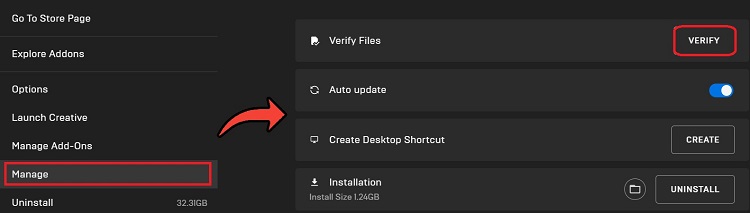
Step 2: If performance issues or loading glitches persist, close the Epic Games Launcher completely by right-clicking its icon in the Windows system tray (bottom-right corner) and selecting Exit.
Step 3: Press Windows + R, type %localappdata%, and press Enter to open the local application data folder. In File Explorer, navigate to EpicGamesLauncher > Saved. Find and delete the webcache folder, along with any webcache_4147 or webcache_4430 folders if present. Then restart Epic Games Launcher to regenerate its cache files.
Method 8: Update Fall Guys and Windows
Running outdated game builds or unpatched operating system versions can cause severe compatibility conflicts and poor hardware utilization.
Step 1: Open the Epic Games Launcher, go to your Library, and click the three dots (...) next to Fall Guys. Select Manage and ensure the Auto Update toggle is switched On so patches install automatically. If a manual patch is pending, an Update button will appear directly under the game tile in your Library, click it to download and install the latest game version.
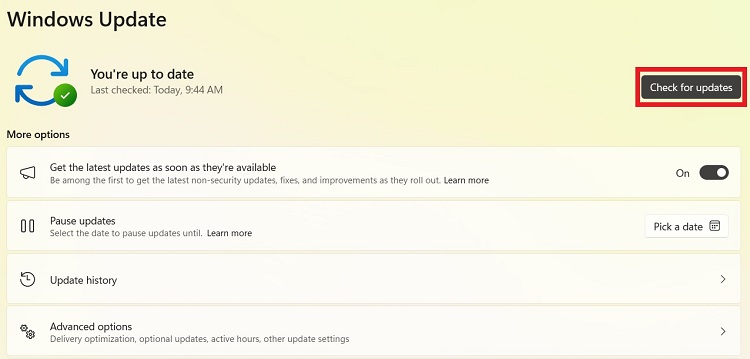
Step 2: Press Windows + I and navigate to Windows Update.
Step 3: Click Check for updates, install any pending cumulative security or graphics updates, and restart your computer.
How to Prevent Fall Guys Lagging Again
Maintaining smooth performance over the long term requires adopting healthy digital habits. To prevent future Fall Guys lagging incidents, incorporate these simple practices into your routine:
Keep Your PC Clean: Remove unnecessary temporary files to free up storage space. Clear the Epic Games Launcher cache when troubleshooting launcher or loading issues.
Keep Drivers Up to Date: Check for new graphics card driver releases whenever major game updates drop.
Monitor System Temperatures: Ensure your PC fans and heatsinks are free of dust to prevent thermal throttling during long gaming sessions.
Manage Network Bandwidth: Avoid running heavy downloads or high-definition streaming services while playing competitive online multiplayer games.
Final Words
Tackling Fall Guys lag doesn’t have to be an overwhelming chore. By systematically checking server statuses, adjusting your network settings, lowering resource-heavy graphics parameters, and maintaining clean system files, you can significantly improve your overall gameplay experience. If you want an easy, all-in-one tool to help streamline hardware optimization, reduce stuttering, and improve frame rate stability, trying Smart Game Booster is a practical option. Try Smart Game Booster to optimize your PC's gaming performance and enjoy a potentially smoother Fall Guys experience.