FPS (Frames Per Second) or Frame Rate plays a huge role in how smooth your game looks and feels. But what is a good FPS for gaming, and how many FPS do you actually need for your setup? In this quick guide, we break down standard FPS tiers, from 30 to 240+ FPS, the best FPS for different types of games, and how to boost your FPS easily.
Common FPS Rates Explained
Before learning what is good FPS for gaming, let’s figure out what common FPS rates mean:
FPS Rates |
Performance Level |
Explanation |
30 FPS |
Minimum |
Offers basic playable visuals for story-driven games. |
60 FPS |
Standard |
Delivers smooth visuals and responsive control. |
120 FPS |
High Performance |
Provides noticeably smoother movement & reduced lag. |
144 FPS |
Competitive Standard |
Offers crisp motion clarity & ultra-fast response times. |
240 FPS |
Pro/Enthusiast |
Minimizes input latency & virtually eliminates motion blur. |
What is a Good FPS for Gaming? (Different Games)
What is a good frames per second for gaming? Check the best FPS rates for different types of games and enjoy the peak gaming performance.
Competitive Shooters & Esports Titles
Ideal FPS: 144 FPS to 240+ FPS
Examples: Valorant, Counter-Strike 2, Apex Legends, Overwatch 2
Fast-Paced Action & Battle Royales
Ideal FPS: 60 FPS to 120 FPS
Examples: Fortnite, Call of Duty, Elden Ring, Rocket League
Story-Driven & Open-World RPGs
Ideal FPS: 60 FPS
Examples: Cyberpunk 2077, GTA V, Red Dead Redemption 2
Other Casual Games
Ideal FPS: 30 FPS-60 FPS
Examples: Civilization VI, The Sims 4, Hearthstone
What is the best FPS for gaming? Now you must have found the answer from the above elaborations.
Why Does FPS Matter for Gaming Performance?
So is higher FPS better for gaming? Yes, FPS directly impacts visual smoothness and control responsiveness. Higher frame rates make fast-moving action appear clearer, reduce screen stuttering, and deliver a better gaming experience.
How to Boost FPS in Gaming (6 Methods)
Now that you know “what is a good FPS for gaming”, how to boost your FPS if you get a poor frame rate on PC?
1. Close Background Programs
Go to “Task Manager” and end unnecessary tasks running in the background to free up the system.
2. Use an FPS Booster
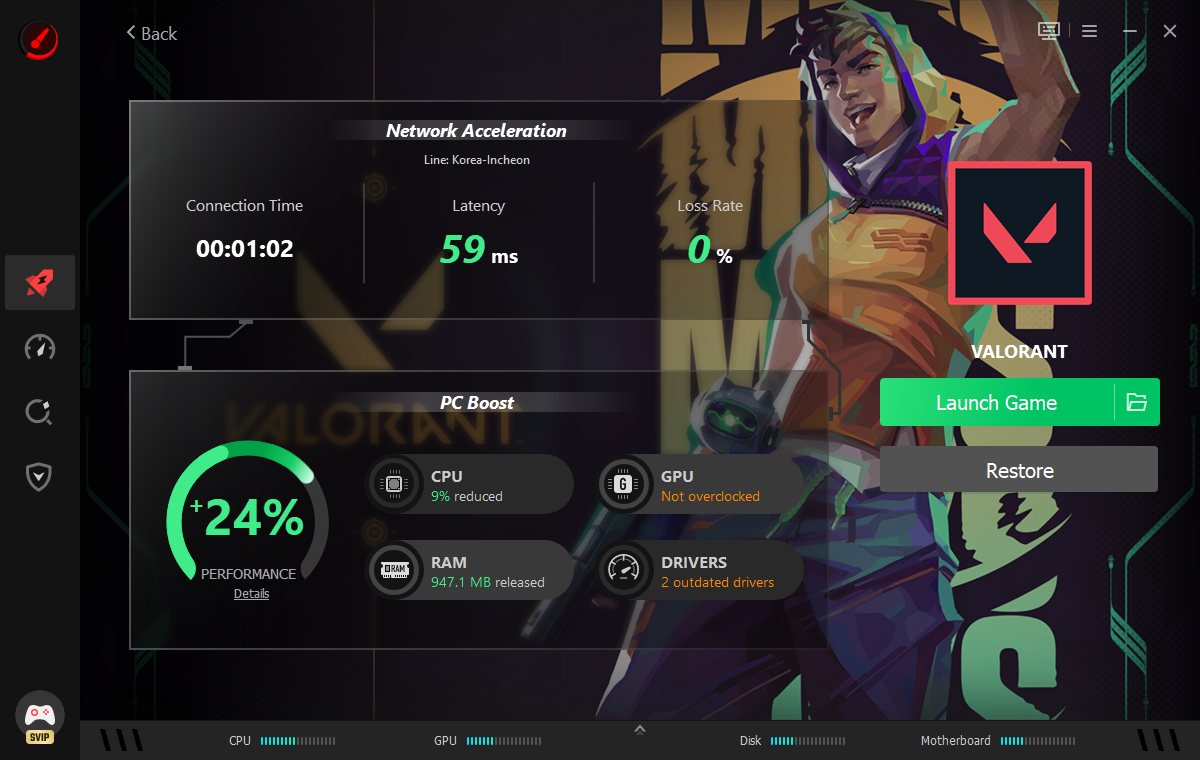
To increase your FPS in gaming, Smart Game Booster is the best free PC FPS booster that impressively optimizes your CPU & RAM and safely overclocks your GPU & VRAM to maximize your FPS for the best PC gaming experiences. Up to 120% FPS boost with 1 click.
3. Update Graphic Drivers
Download the latest drivers from NVIDIA or AMD, or automatically update your outdated graphic drivers with Driver Booster.
4. Optimize Graphics Settings
Lowering demanding visual options like reflections, shadows, and full-screen resolution in your game's settings menu can also boost your FPS.
5. Enable Game Mode
Turn on Windows Game Mode in your system settings to prioritize gaming and minimize frame drops during gameplay.
6. Lower Screen Resolution
Reduce your screen resolution to 1080p instead of 1440p or 4K, which is the quickest way to boost frame rates.
So how many FPS is good for gaming? It depends on what game you are playing. Generally, 60-120 FPS ensures standard and higher performance in games.
Say Goodbye to Choppy Gameplay!
Enjoy lag-free & low-ping gaming
Access 500+ optimized servers
Boost FPS for smoother gameplay