CPU usage sitting at 80%, 90%, or even 100%, what does high CPU usage mean? Simply put, high CPU usage means your processor is working hard to handle active programs, background processes, or system tasks.
High CPU usage is normal during demanding tasks such as gaming. However, consistently high usage while your PC is idle may indicate background processes, outdated drivers, malware, or software conflicts.
What CPU Usage Percentage is Too High?
CPU usage is measured as a percentage of your processor's available processing capacity.
| CPU |
Usage Level |
Possible Impact on Gaming |
| 0–30% |
Low |
Plenty of CPU resources; games should run normally |
| 30–60% |
Normal |
Healthy range for most everyday gaming |
| 60–80% |
High |
Usually acceptable for demanding games |
| 80–95% |
Very High |
May cause FPS drops or stuttering |
| 95–100% |
Critical |
Can cause severe stuttering and input delays |
These ranges are only guidelines. A CPU can safely reach 100% during demanding workloads. The main concern is sustained high usage combined with noticeable performance problems.
Why is My CPU Usage So High?
Several common factors can cause high CPU usage:
Demanding games or apps: Modern games can heavily use CPU resources.
Background processes: Updates, browsers, cloud syncing, and other apps may consume CPU.
Outdated drivers: Incompatible or poorly optimized drivers can increase CPU load.
Startup programs: Too many apps launching with Windows can waste resources.
Overheating: Thermal throttling can reduce performance and cause instability.
How to Reduce High CPU Usage
Now that you understand what does it mean high CPU usage, try the following methods to resolve the issue.
1. Check Which Process is Using Your CPU
Before changing any settings, identify the program consuming the most CPU.
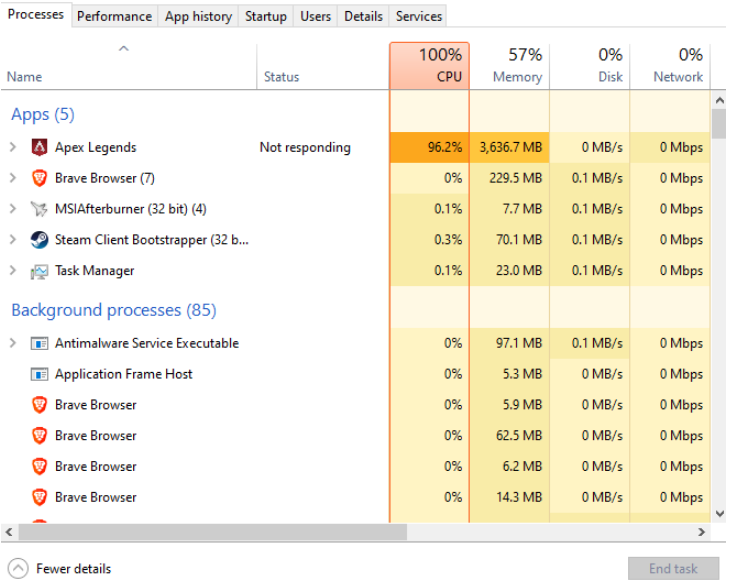
Open Task Manager > Processes tab > CPU column to sort processes by usage > find unnecessary apps and select End Task.
2. Disable Unnecessary Startup Programs
Too many programs launching with Windows can consume CPU resources in the background.
Open Task Manager > Startup apps > locate the programs to disable before startup.
3. Update Windows and Device Drivers
Outdated or incompatible drivers can sometimes cause performance problems. Keeping Windows and important drivers updated can improve system stability.
Open Settings > Windows Update > Check for updates > Install available updates and restart your PC.
4. Reduce CPU-Heavy Game Settings
If CPU usage becomes very high only when playing a particular game, the game itself may simply be demanding too much processing power.
Try reducing settings such as view distance, crowd density, simulation quality, and background object detail. You can also limit the game's FPS to reduce unnecessary CPU workload.
5. Optimize Gaming Performance with Smart Game Booster
If high CPU usage is combined with low FPS, stuttering, or lag, Smart Game Booster can provide a more convenient way to optimize your gaming setup. It can help update relevant drivers and optimize system and game-related settings, potentially reducing performance bottlenecks.
Smart Game Booster for PC
Boost FPS, reduce Ping, and access 500+ global servers. One click to enjoy a faster and lag-free gaming with Smart Game Booster free.
Update drivers:
1. Install and open Smart Game Booster.
2. Go to Driver Update. Scan your PC for outdated drivers.
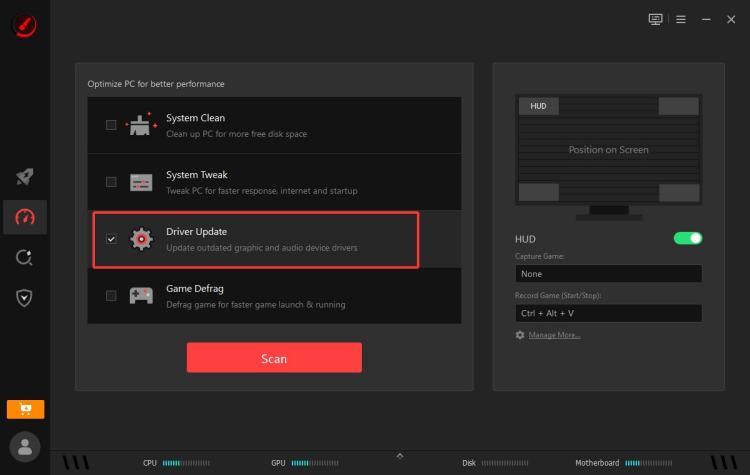
3. Update recommended drivers.
Boost game performance:
Find the game you want to boost FPS, reduce lag or more on the home page. Use its game optimization features before launching your game.

Start the game and check whether CPU usage and overall performance improve. You can view real-time GPU and CPU usage at the bottom of the interface.
Final Words
Now you know what does high usage of CPU mean. Try the methods above to effectively optimize CPU usage and improve your computer's performance for general use and gaming.