If you’re in the middle of a high-stakes match and suddenly hit a line of frustration—lag, connection errors, or being kicked back to the main menu—your first instinct is to ask: are Rainbow Six Siege servers down? Severed connections, unexpected maintenance, and sudden outages can halt your progress instantly, whether you're climbing the ranked ladder or hopping on for a quick casual session with friends.
Knowing how to check the live status of Siege servers saves you time and prevents useless troubleshooting steps like reinstalling the game or restarting your router. By tracking official status dashboards, community outage maps, and social media channels, you can quickly verify if a blackout is widespread or isolated to your region.
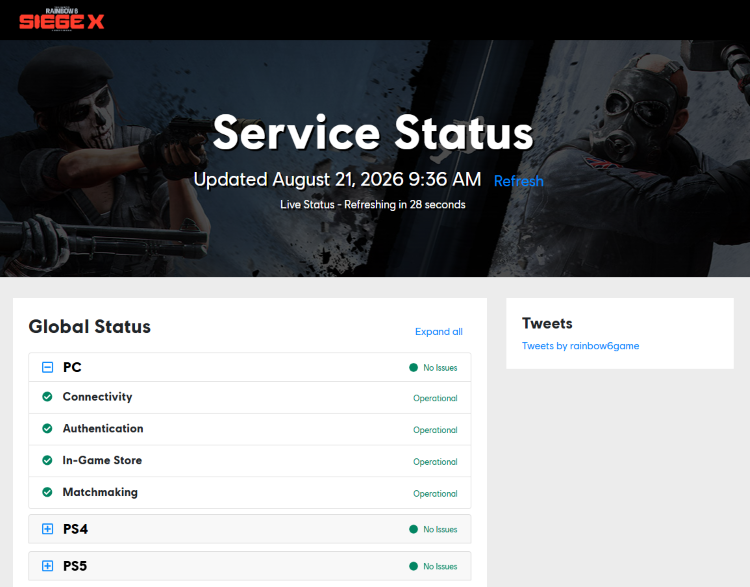
Here’s how:
Step 1. Open Rainbow Six Siege service status site.
Step 2. Check the status of the respective platform you are using.
Step 3. Click + to see service details.
If the official servers are fine, your local connection or system bottlenecks might be the real culprit behind high ping and lag spikes. Solutions like Smart Game Booster can help optimize your PC and network—lowering latency, reducing packet loss, and unlocking extra FPS—to ensure your setup isn't holding you back when servers are live.
Smart Game Booster for PC
Boost FPS, reduce Ping, and access 500+ global servers. One click to enjoy a faster and lag-free gaming with Smart Game Booster free.